
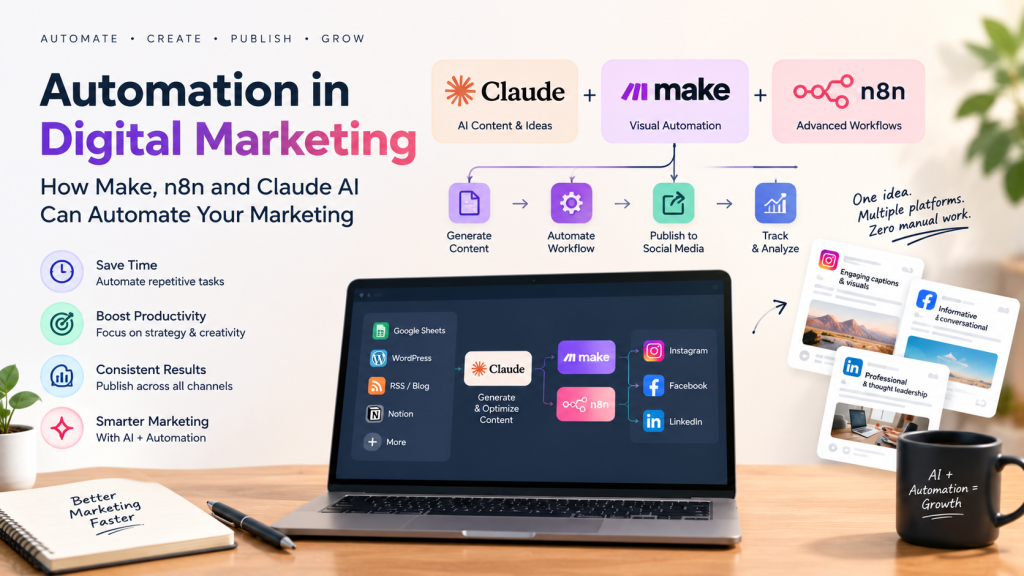
Automation in Digital Marketing: How Make, n8n and Claude AI Can Automate Your Marketing
Digital marketing involves many repetitive tasks: creating social media posts, writing captions, publishing content, collecting leads, sending emails, updating spreadsheets, generating reports and monitoring campaigns.
Doing all of these tasks manually can consume hours every week.
This is where digital marketing automation can make a major difference.
With automation platforms such as Make and n8n, marketers can connect different tools and create workflows that run automatically. When combined with AI tools such as Claude, these workflows can go beyond simple data transfer—they can generate content, analyze information, personalize messages and help make marketing operations much faster.
For example, imagine writing one content idea and having a workflow automatically:
Generate the caption → create platform-specific versions → publish to Instagram → publish to Facebook → publish to LinkedIn → save the content in Google Sheets → record the publishing date.
That is the power of AI-powered marketing automation.
What Is Digital Marketing Automation?
Digital marketing automation means using software and workflows to automatically perform repetitive marketing activities based on predefined triggers and conditions.
Instead of manually performing every step, you create a workflow such as:
Trigger → Process → AI/Logic → Action → Record
For example:
New blog published → Claude creates social captions → workflow formats them → Instagram/Facebook/LinkedIn posts are published → result is recorded in Google Sheets.
Automation doesn’t necessarily mean removing humans from marketing.
The goal is to reduce repetitive work so marketers can spend more time on strategy, creativity and decision-making.
Why Is Automation Important in Digital Marketing?
Marketing teams often spend significant amounts of time on repetitive operational tasks.
Automation can help with:
- Social media publishing
- Content creation
- Lead collection
- Email marketing
- Customer follow-ups
- SEO workflows
- Reporting
- Data entry
- Campaign monitoring
- Content repurposing
- Lead qualification
- Customer segmentation
- Marketing analytics
The biggest advantage is consistency and time savings.
Instead of manually performing the same task every day, you can create the workflow once and allow the automation platform to execute it whenever the required trigger occurs.
Make vs n8n: What Are They?
What Is Make?
Make is a visual workflow automation platform that allows you to connect different applications and create automated scenarios.
A Make workflow is built using modules. Each module performs a particular action, and the modules can be connected together to create an automated process.
For example:
Google Sheets → Claude → Instagram → Facebook → LinkedIn
Make supports integrations for social platforms, AI tools and many other applications. Its current integrations include Instagram for Business, Facebook Pages, LinkedIn and Anthropic Claude.
Make is particularly useful for marketers who want a visual, relatively easy-to-understand automation builder.
What Is n8n?
n8n is a workflow automation platform that can be used to connect applications, APIs, databases and AI models.
It is especially useful when you want more control over your workflows and want to build more advanced automation systems.
For example, an n8n workflow could:
Read a content calendar → send the topic to Claude → generate multiple versions → check the output → route it to different platforms → publish it → save analytics data.
n8n also has Anthropic integrations and a large ecosystem of AI-powered workflows, including social media automation, SEO content generation and LinkedIn publishing workflows.
Make vs n8n for Digital Marketing
Both platforms can be extremely useful.
| Feature | Make | n8n |
|---|---|---|
| Ease of use | Very beginner-friendly | More technical |
| Visual workflows | Excellent | Excellent |
| Advanced logic | Good | Excellent |
| API integration | Yes | Yes |
| AI workflows | Yes | Yes |
| Social media automation | Yes | Yes |
| Customization | Good | Very high |
| Best for | Marketers & agencies | Advanced automation users |
If you are starting with automation, Make can be an easier place to begin.
If you want highly customized workflows and are comfortable working with APIs, webhooks and technical logic, n8n can be a powerful choice.
Where Does Claude AI Fit Into Marketing Automation?
This is where things become much more interesting.
Make and n8n can act as the automation engine, while Claude can act as the AI content and reasoning layer.
Think of it this way:
Make/n8n = Workflow
Claude = Intelligence
Social media platforms = Output
Claude can be used to generate or transform marketing content before the workflow sends it to the appropriate destination.
For example:
Content topic → Claude → Instagram caption
Content topic → Claude → LinkedIn post
Content topic → Claude → Facebook post
The same original idea can therefore become different pieces of content for different platforms.
What Types of Digital Marketing Automations Can You Create?
There are many possibilities.
1. Social Media Content Automation
One of the most useful applications is automatically creating and distributing social media content.
A workflow could start from:
- Google Sheets
- Airtable
- Notion
- WordPress
- RSS feed
- Google Drive
- Content calendar
The information can then be sent to Claude to generate captions.
The workflow can then publish the approved content to social media platforms.
Make currently provides modules for Instagram for Business, Facebook Pages and LinkedIn, including actions for creating Instagram posts, Facebook posts and LinkedIn company/user posts.
2. Instagram + Facebook + LinkedIn Automation
This is one of the most useful workflows for a digital marketing agency.
Imagine you have a content calendar in Google Sheets:
| Date | Topic | Image | Status |
|---|---|---|---|
| Monday | SEO Tips | Image 1 | Ready |
| Wednesday | AI Marketing | Image 2 | Ready |
| Friday | Website Tips | Image 3 | Ready |
The automation can read the next approved topic and send it to Claude.
Claude can create:
Instagram:
Short, engaging caption with hashtags.
Facebook:
Slightly longer conversational post.
LinkedIn:
Professional, insight-driven post.
The automation then sends the appropriate version to each platform.
Example workflow:
Google Sheets
↓
Get approved content
↓
Claude AI
↓
Generate Instagram caption
↓
Generate Facebook post
↓
Generate LinkedIn post
↓
Publish to Instagram
↓
Publish to Facebook
↓
Publish to LinkedIn
↓
Update Google Sheets: Published
This means one content idea can become a multi-platform campaign with minimal manual work.
3. AI Content Repurposing
Suppose you publish a 1,500-word blog.
Instead of creating every social post manually, automation can take the blog and ask Claude to create:
- 1 LinkedIn post
- 1 Facebook post
- 3 Instagram captions
- 5 short social media hooks
- 10 tweet/X ideas
- Email newsletter copy
- Short video ideas
The workflow can then store these outputs in your content database.
This creates a content repurposing machine.
4. Blog-to-Social Automation
You can also connect your WordPress website to your social media workflow.
For example:
New WordPress blog published
↓
Get blog title + URL + featured image
↓
Send information to Claude
↓
Claude creates platform-specific content
↓
Publish to social media
This can help ensure that every new blog receives promotional content automatically.
5. Lead Generation Automation
Marketing automation isn’t limited to social media.
You can create a workflow such as:
Website form submission
↓
Google Sheets/CRM
↓
Claude analyzes the lead
↓
Classify lead as Hot / Warm / Cold
↓
Send notification to sales team
↓
Create follow-up task
This can reduce the time required for manual lead sorting.
6. Email Marketing Automation
You can automate parts of your email marketing process.
For example:
New lead
↓
Claude analyzes lead information
↓
Generate personalized email
↓
Send email
↓
Record activity in CRM
You can also automate:
- Welcome emails
- Follow-ups
- Newsletter generation
- Lead nurturing
- Customer segmentation
- Email summaries
- Personalized outreach
Human review can still be added before sending important campaigns.
7. SEO Automation
AI and workflow automation can also be combined for SEO.
For example:
Keyword list in Google Sheets
↓
Claude creates content brief
↓
Generate title ideas
↓
Generate meta description
↓
Create outline
↓
Create draft
↓
Send to Google Docs/WordPress
↓
Human review
↓
Publish
This can significantly reduce the repetitive parts of content production.
8. Marketing Report Automation
Reporting is another area where automation can save significant time.
Instead of manually collecting information from different platforms, you can create workflows that collect data from your marketing tools.
For example:
Google Ads + Meta Ads + Google Analytics + CRM
↓
Collect campaign data
↓
Store in Google Sheets
↓
Claude analyzes the data
↓
Generate marketing summary
↓
Send report to client
The report could explain:
- What performed well
- What performed poorly
- Campaign trends
- Potential problems
- Recommended actions
9. Competitor Monitoring
You can also create automated competitor-monitoring workflows.
For example:
Competitor website/RSS/news source
↓
New update detected
↓
Claude analyzes the update
↓
Classify as Product / Pricing / Content / Marketing
↓
Save to database
↓
Send notification
This can help marketing teams stay informed without manually checking competitors every day.
10. Customer Review Automation
Reviews can also be processed automatically.
For example:
New customer review
↓
Claude analyzes sentiment
↓
Positive / Neutral / Negative
↓
Generate suggested response
↓
Send for approval
↓
Publish response
This is especially useful for businesses receiving a large number of reviews.
The Most Useful Workflow for a Digital Marketing Agency
If you are building a digital marketing agency, one of the first automations I would recommend is a Multi-Platform AI Content Publishing System.
The basic architecture can look like this:
Step 1: Content Calendar
Store your content in:
Google Sheets / Airtable / Notion
Include:
- Topic
- Content type
- Image/video
- Publishing date
- Platform
- Status
Step 2: Automation Trigger
Make or n8n checks whether content is scheduled for publication.
Step 3: Claude AI
Claude receives the topic and brand guidelines.
It creates platform-specific content.
For example:
Instagram: Short + engaging + hashtags
Facebook: Conversational + informative
LinkedIn: Professional + thought leadership focused
Step 4: Approval
Instead of immediately publishing everything, you can add an approval step.
For example:
Claude → Google Sheet/Slack → Human Approval
Step 5: Publishing
Once approved:
Instagram → Publish
Facebook → Publish
LinkedIn → Publish
Step 6: Record Everything
The workflow updates the content calendar:
Status = Published
Published Date = 15 September
Platforms = Instagram + Facebook + LinkedIn
This gives you a complete record of your content.
Can You Post Directly to Instagram, Facebook and LinkedIn?
Yes, automation can be used to publish content to these platforms, but the exact setup depends on the account type, permissions and platform/API requirements.
For Instagram, Make supports Instagram for Business through Facebook login and provides actions such as photo, carousel and Reel publishing.
For Facebook, Make supports Facebook Pages and provides publishing actions for posts, photos, videos and Reels.
For LinkedIn, Make supports company and user posting actions, including text, image and video posts. LinkedIn’s own API documentation also provides mechanisms for creating posts, subject to the required permissions and access.
So your desired system is technically possible:
One content source → Claude → Instagram + Facebook + LinkedIn
However, you should always configure the appropriate official platform connections and permissions rather than relying on unofficial browser automation.
Where Your Claude Pro Subscription Fits
If you already use Claude Pro, it can be very useful for manually creating prompts, developing content strategies, writing posts and testing your automation logic.
However, there is an important distinction.
Your Claude Pro subscription is for Claude’s consumer chat experience. It does not automatically include Anthropic API usage for Make or n8n. Anthropic states that Claude.ai paid plans and the API Console are separate products, and API usage requires separate setup and billing.
Therefore, if you want:
Make/n8n → Claude automatically
you should plan for:
Make/n8n → Anthropic API → Claude
rather than assuming your Pro subscription alone provides API credits.
Claude + Make vs Claude + n8n
Claude + Make
A simple agency workflow could be:
Google Sheets
→ Make
→ Claude
→ Google Sheets
This is a good starting point if you want a visual workflow.
Make already provides integrations between Claude and Instagram, as well as Claude and LinkedIn.
Claude + n8n
A more advanced system could look like:
Webhook
→ n8n
→ Content Database
→ Claude
→ Content Validation
→ Approval
→ Instagram/Facebook/LinkedIn
→ Analytics
→ Database
n8n can also be used to build more complex AI workflows involving Claude, social media, SEO and content generation.
Should You Automate Everything?
Not necessarily.
A common mistake is trying to completely automate marketing without human supervision.
AI-generated content can sometimes:
- Use the wrong tone
- Make factual mistakes
- Repeat ideas
- Use inappropriate hashtags
- Misunderstand the target audience
- Produce generic content
For this reason, an approval step is often better than completely automatic publishing.
A strong workflow is:
AI creates → Human reviews → Automation publishes
rather than:
AI creates → Automatically publishes everything
This gives you both efficiency and quality control.
Best Digital Marketing Automation Stack
A simple stack for a small digital marketing agency could look like:
Claude
For AI content generation and analysis.
Make
For visual workflow automation.
n8n
For advanced/custom automation.
Google Sheets / Airtable
For content calendars and data.
WordPress
For website and blog publishing.
Instagram
For visual content.
Facebook Pages
For community and social distribution.
LinkedIn
For professional content and B2B marketing.
Together, these tools can form an automated marketing ecosystem.
Example: Your Complete AI Marketing Workflow
Imagine you want to publish one marketing topic:
“5 Benefits of SEO for Small Businesses”
You enter only:
Topic: 5 Benefits of SEO for Small Businesses
Then automation takes over.
Claude generates:
Instagram:
Short caption + hook + hashtags
Facebook:
Educational post + CTA
LinkedIn:
Professional thought-leadership post
Blog:
Long-form SEO article
Email:
Newsletter version
Make/n8n then:
- Saves the content
- Sends it for approval
- Publishes it to Instagram
- Publishes it to Facebook
- Publishes it to LinkedIn
- Publishes the blog
- Records the publishing status
- Stores the content URL
- Sends a notification
One idea can therefore become an entire marketing campaign.
The Future of Digital Marketing Automation
The future of digital marketing is moving from individual AI tools toward connected AI workflows.
Instead of using AI only to write content, marketers can connect AI to the entire marketing process.
The workflow could eventually look like:
Research → Strategy → Content → Design → Approval → Publishing → Analytics → Optimization
AI can assist with the intelligence-heavy parts, while automation platforms connect the different tools together.
This means digital marketers increasingly need to understand not only SEO, social media and content marketing, but also AI, APIs, automation and workflow design.
Conclusion
Digital marketing automation can save marketers from repetitive work while improving consistency and scalability.
Make provides a visual approach to connecting marketing applications, while n8n offers powerful options for more customized and advanced workflows.
When you add Claude AI, the workflow becomes even more powerful because AI can generate, transform, analyze and personalize marketing content.
For a digital marketing agency, one of the most valuable use cases is a multi-platform content automation system:
Content Calendar → Claude → Approval → Instagram + Facebook + LinkedIn → Reporting
The goal isn’t to replace the marketer.
The goal is to let the marketer spend less time on repetitive tasks and more time on strategy, creativity, client relationships and business growth.
AI creates the intelligence. Automation moves the work. The marketer makes the decisions.